The lead engine,
explained end to end.
Every firing n8n workflow behind Stonebriar's lead automation — what fires it, what each module does, and where it hands off next. Verified against the live system on 2026-06-18: only the workflows actually running in production are shown here, each at full module-flow depth.
01System overview
From a brand-new lead to a booked roof inspection — the whole journey runs itself. Here is what happens end to end, then the moving parts underneath.
The big picture
When a new homeowner lead lands in GoHighLevel, the system takes it from there. It texts a satellite photo of their roof, and Sarah — the voice AI — calls within seconds, qualifies them, and books a roof inspection straight into the calendar. Reminders, reschedules, and follow-up all run on their own. Your team only steps in to show up and inspect the roof, and every step is written back to the CRM, so nothing is invisible.
The moving parts
Five layers do the work; n8n sits in the middle — it listens to GoHighLevel, makes the decisions, and orchestrates Retell, Twilio and the CRM.
How a lead enters
GoHighLevel · WF-1 14-Day Lead Cadencein GoHighLevelBefore any n8n runs, the lead is created and tagged in the CRM — that tag is what starts everything below.Outcome A new contact tagged non-booked-funnel (or non-booked-funnel-lead) in GoHighLevel is the starting gun: GHL's WF-1 workflow fires the First Touch webhook (the next section), and from there n8n runs the whole journey.
non-booked-funnel or non-booked-funnel-lead (it has a separate trigger for each) — and POSTs to the First Touch webhook, which is where the n8n workflows below take over.Satellite roof image
Stonebriar_Roof_ImagefiringBuild a Google Static Maps satellite photo URL from the lead's property address and write it to the GHL contact for use in the intro SMSOutcome A satellite photo of the lead's roof is saved onto their CRM contact — which First Touch then attaches to the intro text it sends the homeowner. (If the photo can't be built, First Touch just sends text only.)
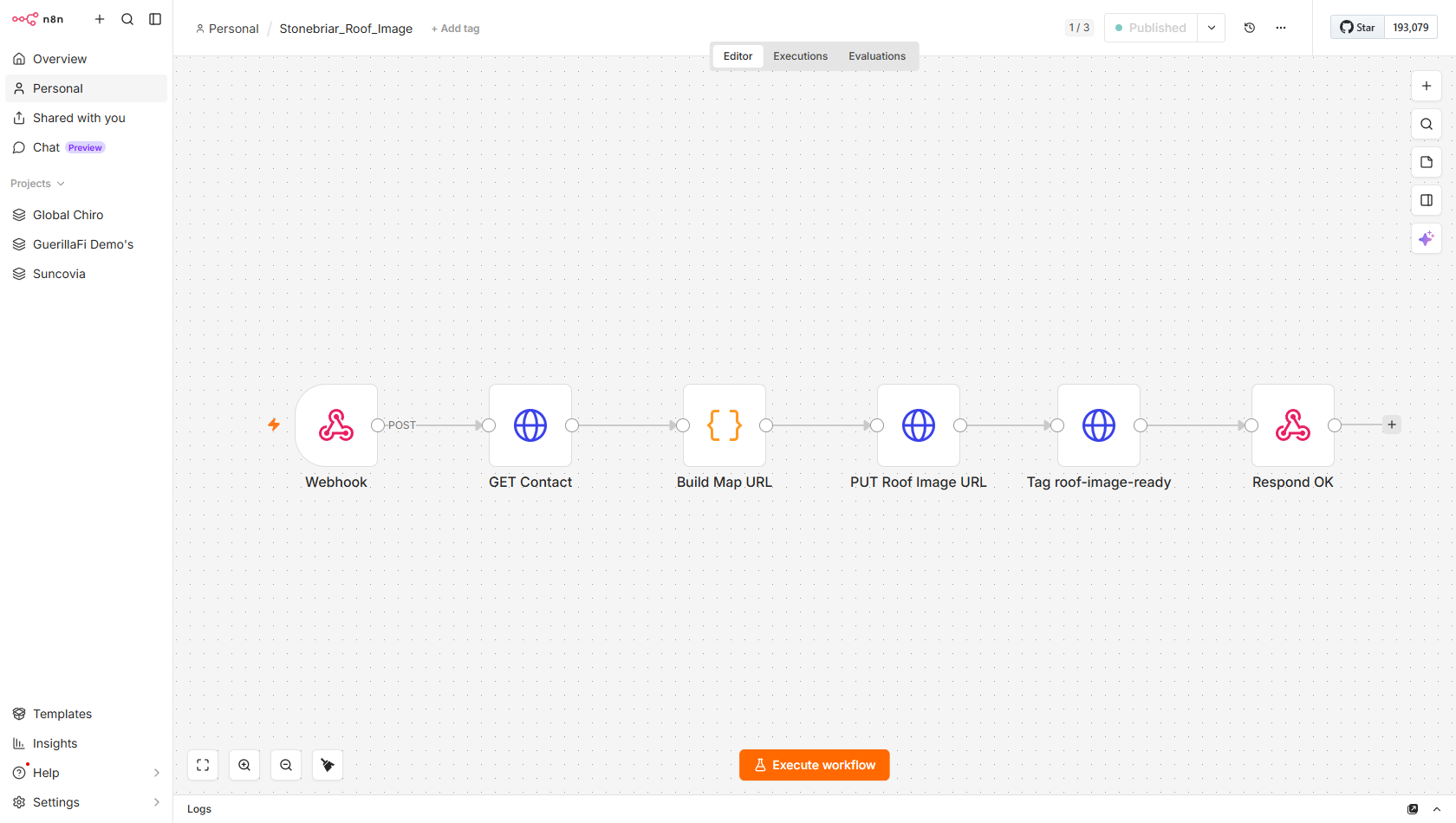
Trigger
HTTP POST to stonebriar/roof_image from Stonebriar_First_Touch immediately after guard checks pass. Payload: {contact_id}.
Module flow
- Webhook—Listens at stonebriar/roof_image; accepts POST with contact_id stonebriar/roof_image
- GET Contact—Fetches full GHL contact to extract address1, city, state fields for the map URL /contacts/{id} address1 city state
- Build Map URL—Code node: encodes the property address into a Google Static Maps API URL with satellite maptype, 600x400 size, zoom=20; API key placeholder still present in code comment Google Static Maps API satellite zoom=20
- PUT Roof Image URL—Writes the constructed satellite URL to GHL custom field WRDAthnXubJbA9GrYQbn on the contact WRDAthnXubJbA9GrYQbn /contacts/{id}
- Tag roof-image-ready—Adds tag roof-image-ready to confirm the image field is populated and ready for SMS roof-image-ready /contacts/{id}/tags
- Respond OK—Returns 200 to First_Touch so it can proceed to read the field after the 10-second wait
Speed-to-lead first touch
Stonebriar_First_TouchfiringSend a satellite roof photo via SMS and place two outbound voice calls within minutes of a new lead entering the funnelOutcome Within minutes of a new lead, the homeowner gets a text with a satellite photo of their own roof and Sarah calls them (twice if there's no answer). Whatever happens on the call is then handled by Post-call.
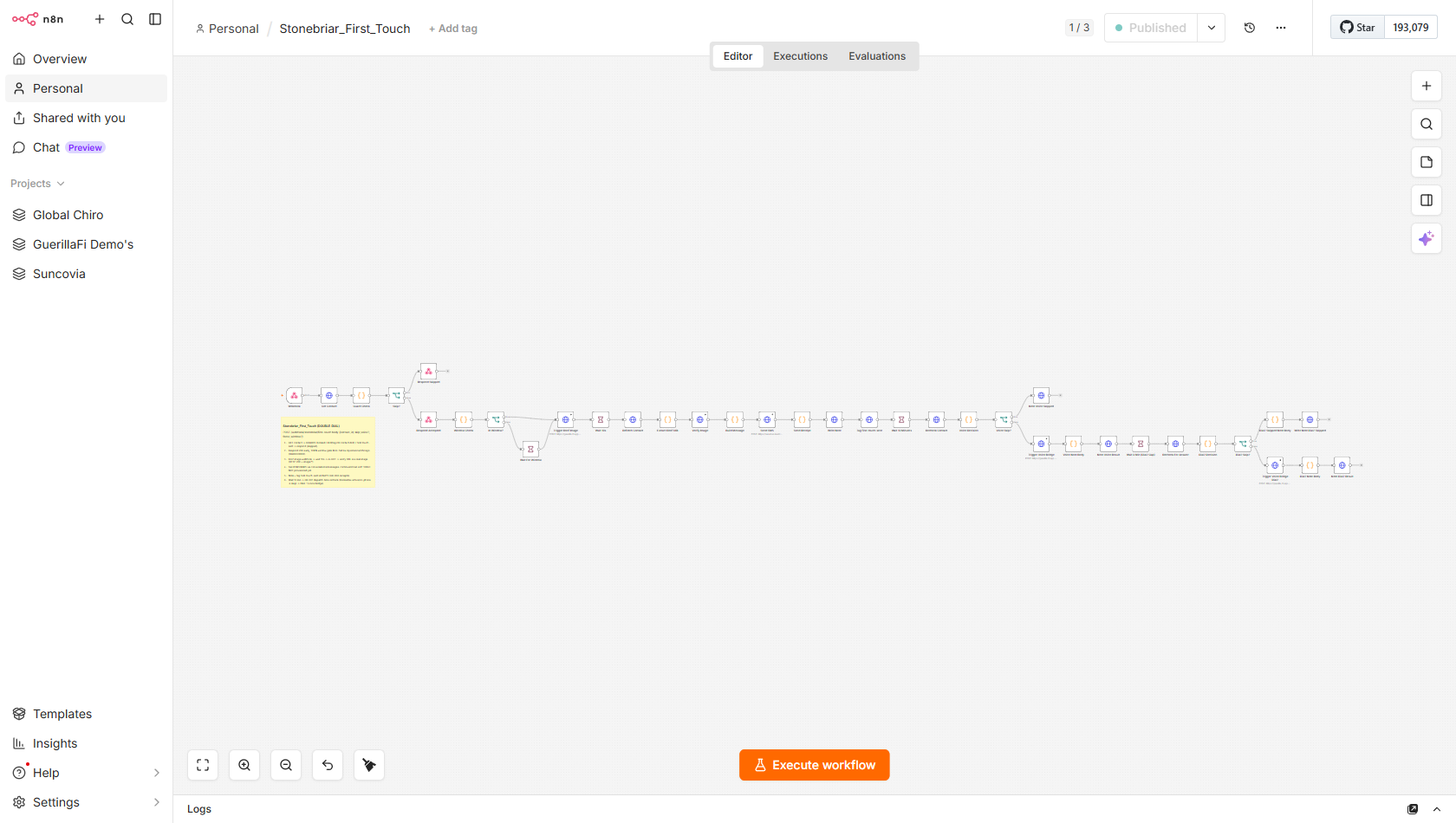
Trigger
HTTP POST to stonebriar/first-touch from GHL Workflow-1 (fired by the non-booked-funnel tag). Payload: {contact_id}. Fires within seconds of Lead_Intake completing the tag write.
Module flow
- Webhook + Get Contact—Receives contact_id; immediately fetches full GHL contact record for guard evaluation contact_id
- Guard Check + Skip? IF—Code node evaluates skip conditions (DND, first-touch-sent, booked, ai-active); IF routes to Respond Skipped with reason note, or Respond Accepted to continue async DND first-touch-sent booked ai-active
- Window Check (always open)—Code node always returns in_window=true -- send window removed 2026-06-15 per Jay; gate retained for fast re-enabling in_window
- Trigger Roof Image + Wait 10s—HTTP POST to stonebriar/roof_image; waits 10 seconds for async satellite map build to complete stonebriar/roof_image WRDAthnXubJbA9GrYQbn
- Extract Roof URL + Verify Image—Reads roof image URL from custom field WRDAthnXubJbA9GrYQbn; HTTP GET verifies image returns 200 with image/* content-type WRDAthnXubJbA9GrYQbn content-type
- Build Message + Send SMS—Assembles intro SMS with roof photo; sends via GHL conversations API (with image if valid, text-only fallback if URL fails) /conversations/messages roof photo
- Write Note + Tag first-touch-sent—Writes CRM note confirming SMS send result; adds tag first-touch-sent to prevent duplicate re-send first-touch-sent /contacts/{id}/notes
- Wait 10 Minutes + Recheck (Dial 1 guard)—Waits 1 minute (node label says 10 min; actual config is 1 min); re-fetches contact to check for post-touch outcome tags before dialing Wait 10 Minutes
- Voice Decision + Voice Skip? (Dial 1)—Code node checks if contact gained engaged/booked/callback/ai-active tags during the wait; IF skips Dial 1 and writes note if already answered engaged-not-booked callback-scheduled
- Trigger Voice Bridge Dial 1 + Note—HTTP POST to voice_trigger_call webhook (9f45335d); writes CRM note with Dial 1 outcome (success or error) 9f45335d-da8b-47c4-9465-6e9e6b2c571b Dial 1
- Wait 3 Min + Recheck For Answer (Dial 2 guard)—Dial 2 gap: waits 3 minutes, re-fetches contact to check if Dial 1 was answered before placing Dial 2 Dial2 gap
- Trigger Voice Bridge Dial 2 + Note—HTTP POST to same voice_trigger_call webhook for second call attempt (iPhone call-screen bypass); writes Dial 2 outcome note Dial 2 call-screen bypass
Outbound voice call dial
StoneBriar_voice_trigger_callfiringAssemble full contact and campaign context, check for existing bookings, guard against a suppressed call, enforce Retell concurrency limits, then dial the lead as SarahOutcome Sarah places the outbound call as herself, already knowing the homeowner's name, storm-damage details and timezone. When the call ends, Post-call logs it and updates the CRM.
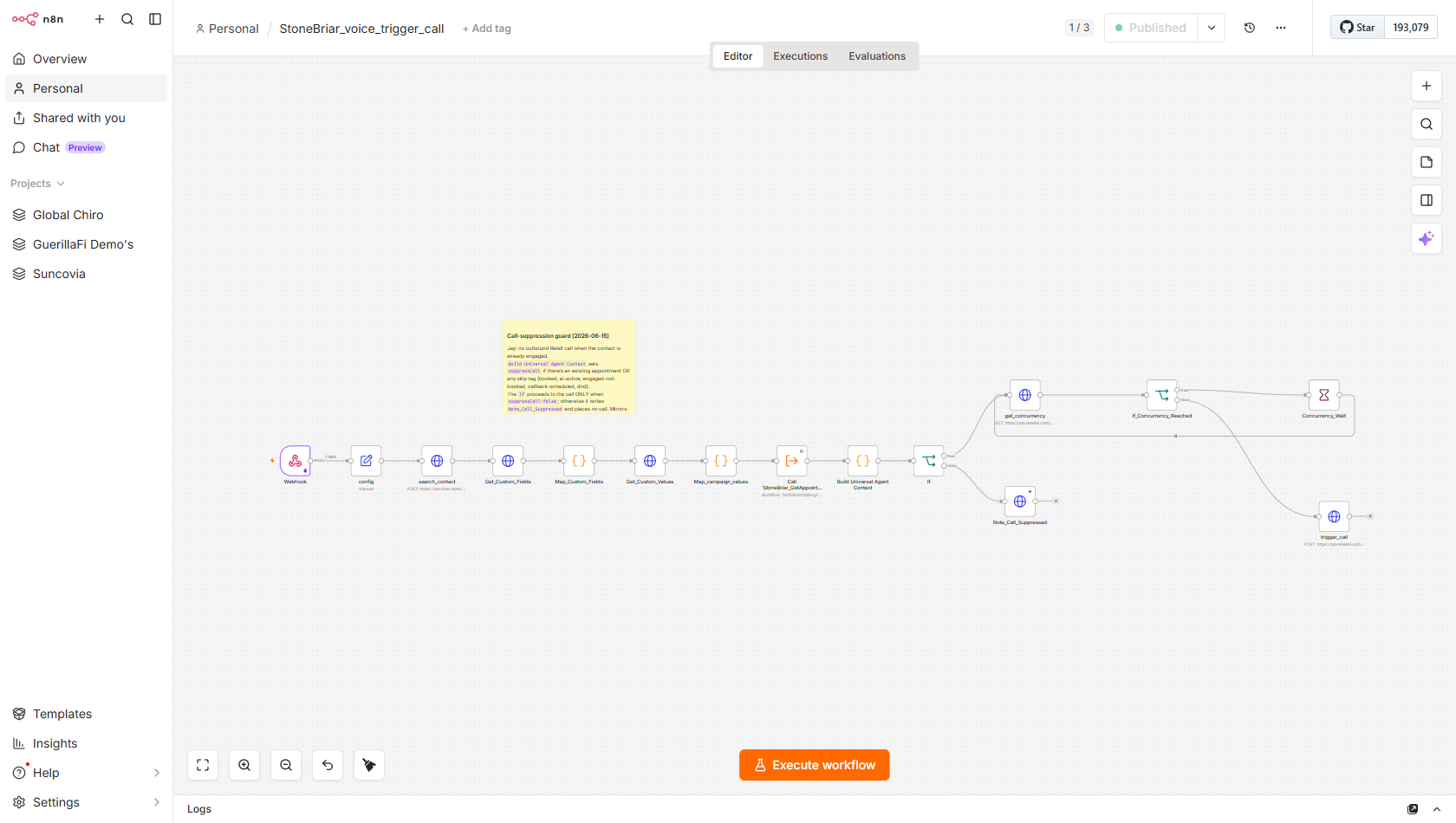
Trigger
HTTP POST to webhook path 9f45335d-da8b-47c4-9465-6e9e6b2c571b. Called by: Stonebriar_First_Touch (Dial 1 and Dial 2), GHL Automation directly for non-first-touch leads, and Tag_Bridge_Poller for the callback-requested bridge. Payload: {phone, contact_id, first_name, email, and optional custom data}.
Module flow
- config—Set node: stores retell_api key, from_phone=+12149721282, GHL API key, and location ID U9eehdYVTaneVBVevw0b key_0e3e94c358e8b7827192512dcf1f +12149721282 U9eehdYVTaneVBVevw0b
- search_contact—GHL /contacts/search by phone to fetch the full contact record /contacts/search
- Get_Custom_Fields + Get_Custom_Values—Fetches all GHL custom field definitions for the location and location-level custom values containing campaign metadata /customFields /customValues
- Map_Custom_Fields + Map_campaign_values—Two code nodes: first maps GHL field IDs to human-readable names for the contact; second extracts campaign values (storm_damage_type, campaign_name) customFields[] storm_damage_type campaign_name
- Call StoneBriar_GetAppointments_SubWorkflow—Executes sub-workflow to fetch existing confirmed future appointments -- GR-001 dispatch-time booking state recheck before dialing GetAppointments_SubWorkflow GR-001
- Build Universal Agent Context—Code node: assembles all data into named Retell variables -- roof_age, roof_type, lead_stage, call_number=1, previous_call_summary, prospect_timezone=America/Chicago hardcoded, suppressCall flag retell_llm_dynamic_variables prospect_timezone America/Chicago suppressCall
- If (suppress check)—IF node: if suppressCall=true (contact already booked or no phone), routes to Note_Call_Suppressed (writes CRM note) and stops suppressCall Note_Call_Suppressed
- get_concurrency + If_Concurrency_Reached + Concurrency_Wait—GET /get-concurrency from Retell; if current_concurrency >= 40, loops on Concurrency_Wait node until a slot opens /get-concurrency current_concurrency >= 40 Concurrency_Wait
- trigger_call—HTTP POST to Retell /v2/create-phone-call with agent_c7489b1000369067c5ef69e0dc, from +12149721282, to phone, and full retell_llm_dynamic_variables bundle agent_c7489b1000369067c5ef69e0dc /v2/create-phone-call
Sub-workflows used: StoneBriar_GetAppointments_SubWorkflow
Mid-call calendar tools
StoneBriar_Voice_Calendar_BookingsfiringRespond to Sarah's live function-tool calls during a voice conversation -- check availability, book, reschedule, or retrieve the homeowner's appointment, within a 10-second Retell timeoutOutcome While Sarah is live on the call she can check times, book, reschedule or look up the inspection on the spot — the booking lands on the CRM calendar and the contact is tagged booked, all before the call ends.
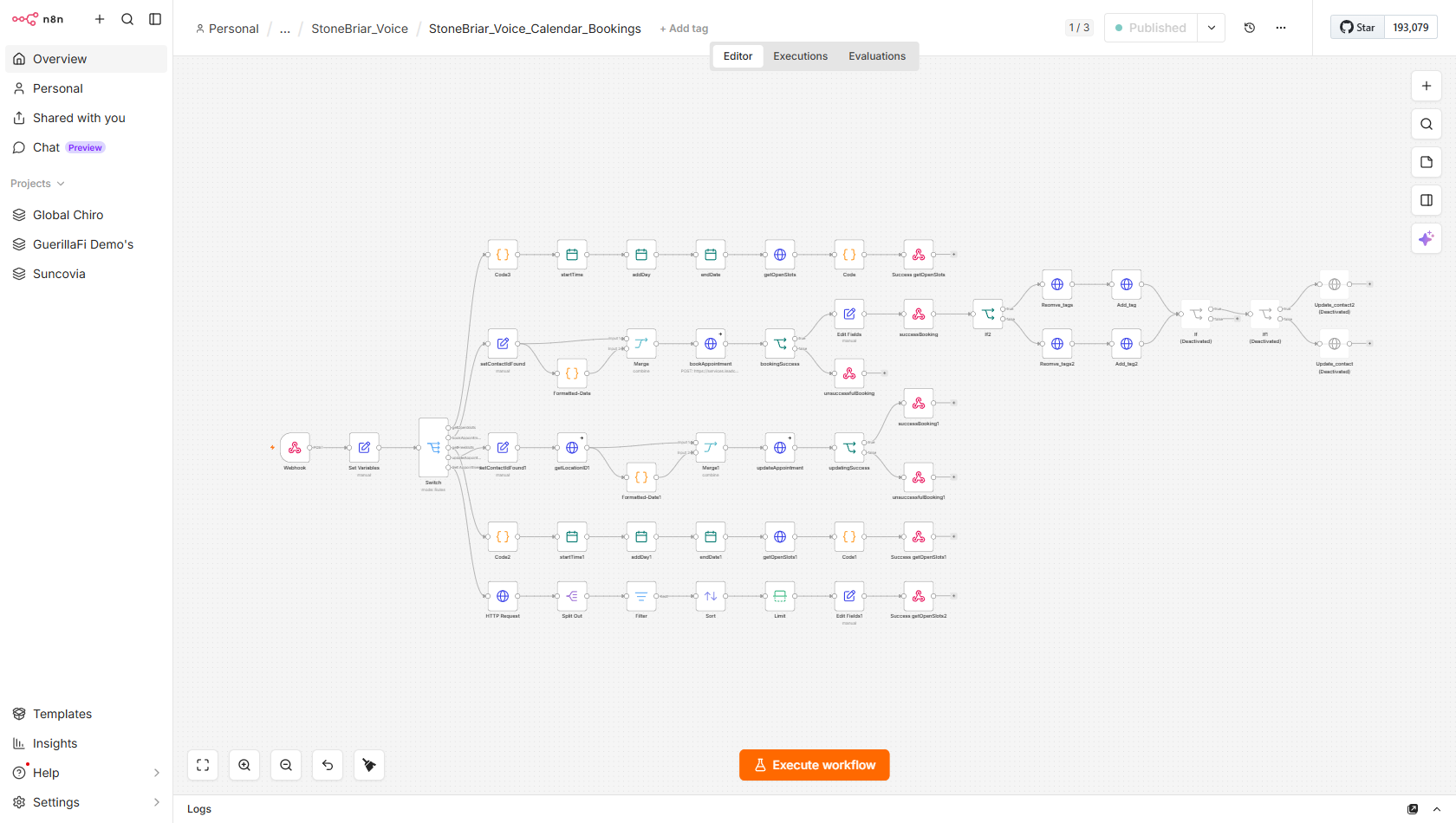
Trigger
HTTP POST to f9d1c743-5530-4ac0-9770-63aab57dac06 from the Retell voice agent whenever she calls one of 5 registered function tools mid-call. The body.name field identifies which tool. responseMode=responseNode means a respondToWebhook node must fire within Retell's tool timeout.
Module flow
- Webhook -> Set Variables—Webhook receives Retell tool call; Set Variables loads calendarId=HwJD5Ujgck1FJERzBZVw, time_zone, API key, user_id HwJD5Ujgck1FJERzBZVw f9d1c743-5530-4ac0-9770-63aab57dac06
- Switch -> 5 routes on body.name—Switch routes on: check_calendar_availability (out0), book_appointment (out1), check_calendar_slots (out2), update_appointment (out3), get_appointment (out4) check_calendar_availability book_appointment check_calendar_slots update_appointment get_appointment
- Route 0: check_calendar_availability—Code3 -> date math (startTime/addDay/endDate) -> GET /calendars/free-slots (timezone from Set Variables) -> Code formats voice-ready slot list -> respondToWebhook /calendars/free-slots time_zone
- Route 2: check_calendar_slots—Code2 -> date math -> GET /calendars/free-slots (America/Chicago hardcoded) -> Code1 formats grouped time ranges -> respondToWebhook /calendars/free-slots America/Chicago
- Route 1: book_appointment—setContactIdFound -> date format + Merge -> calls appointment_booking_sub_workflow (mjLv4YHPv7CtDCES) -> on success: writes event_id to contact, removes stale tags, adds booked or ai-booked based on lead_stage -> respondToWebhook success or failure message mjLv4YHPv7CtDCES event_id booked ai-booked
- Route 3: update_appointment—setContactIdFound1 -> date format + Merge1 -> calls Update_Appointment_SubWorkFlow (D0E0AxALdJmYcfLx) -> on success: writes new event_id, updates tags -> respondToWebhook D0E0AxALdJmYcfLx event_id
- Route 4: get_appointment—HTTP GET /contacts/{id}/appointments -> Split Out -> Filter (confirmed + future, America/Chicago) -> Sort desc -> Limit 1 -> format fields -> respondToWebhook with summary or no-appointment message /contacts/{id}/appointments America/Chicago confirmed
Sub-workflows used: stoneBriar_appointment_booking_sub_workflow StonBriar_Update_Appointment_SubWorkFlow
Post-call processing
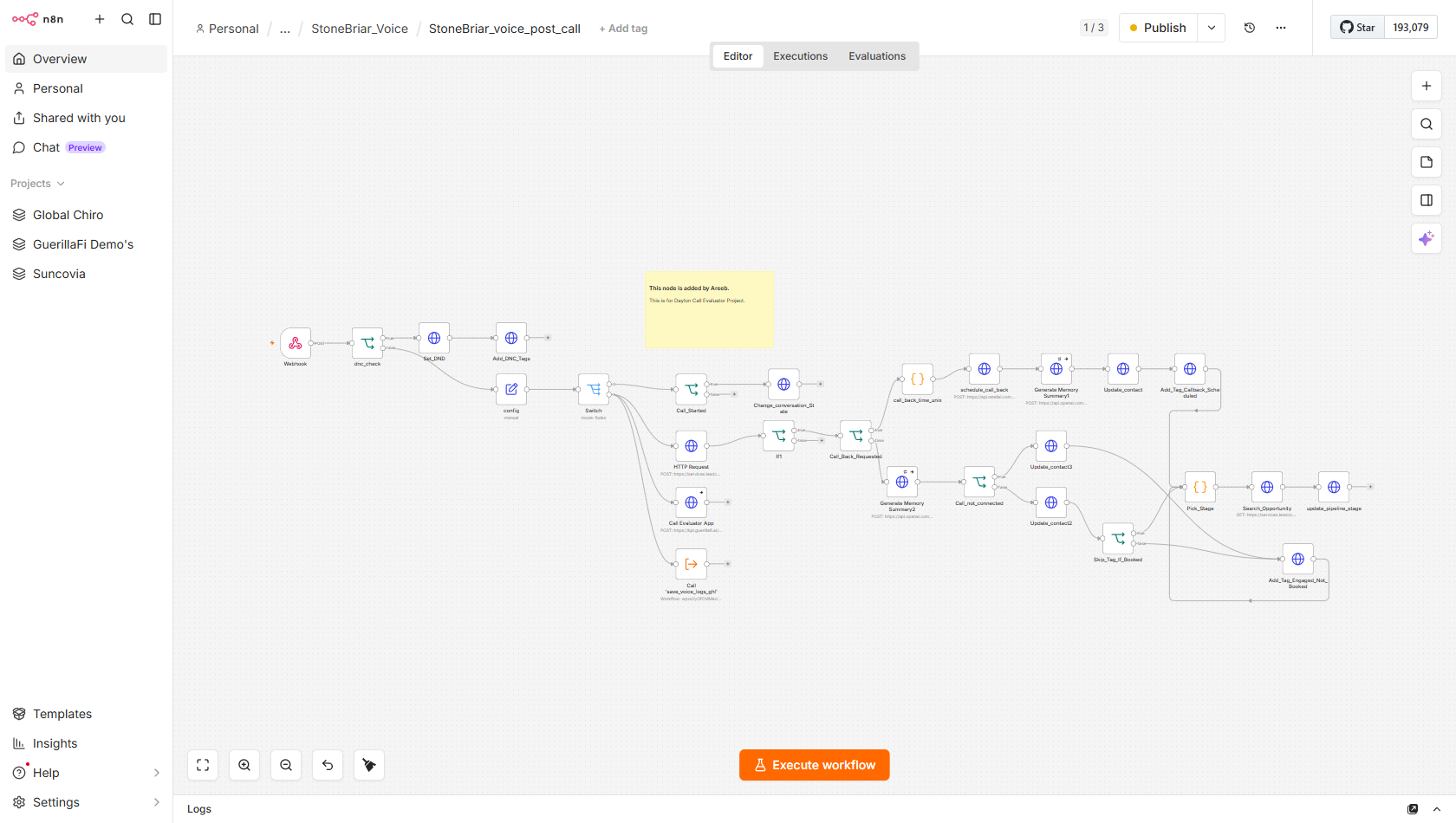
StoneBriar_voice_post_callfiringAfter every Retell call ends: enforce DNC compliance, update conversation state on call_started, generate an AI memory summary, move the pipeline stage, and schedule callbacksOutcome After every call the homeowner is routed correctly: opt-outs are set to Do-Not-Call and stopped; everyone else gets a written call summary, the right pipeline stage, and a callback scheduled if they asked. This is what keeps the CRM truthful after each call.
Trigger
HTTP POST to webhook path 12d1db5a-4bc9-4c17-88b3-9ca5f5b20872 from Retell's post-call webhook. Fires for every call event. body.event is either call_started (call connected) or call_analyzed (call ended and analyzed). First node is always the DNC gate.
Module flow
- dnc_check—IF node: checks custom_analysis_data.opt_out_requested -- if true, sets contact DND=true and adds tags DNC + dnc-honored, then stops all further processing opt_out_requested DND DNC dnc-honored
- config + Switch—Set node loads GHL and Retell creds; Switch routes on body.event: call_started to out0, call_analyzed to out1 call_started call_analyzed
- Call_Started -> Change_conversation_State—On call_started event: IF verifies call_status=ongoing, then PUTs GHL conversation to active state for real-time CRM visibility during the call /conversations/{id} active
- HTTP Request + If1 (appointments fetch)—Fetches contact appointments to inform outcome routing; If1 gates entry into the call_analyzed branch /contacts/{id}/appointments
- Call_Back_Requested IF -> schedule_call_back—Branches on lead_qualification_status=Qualified - Callback Scheduled; TRUE path parses callback time and POSTs Retell create-batch-call with trigger_timestamp Qualified - Callback Scheduled /create-batch-call trigger_timestamp
- Generate Memory Summary1/2 + Update_contact—OpenAI generates a call memory summary; writes it back to GHL contact along with call disposition and lead_stage fields OpenAI ai_interaction_summary previous_call_summary
- Pick_Stage code node—Maps call outcome to GHL pipeline stage IDs: booked->Inspection Booked, callback/voicemail/hang_up/no_answer->Contact Attempted, wrong_number->No-Show/Cancel, opted_out->Dead-Max Attempts booked callback_scheduled no_answer wrong_number opted_out fMFWsnKweG7UwwUTnDJ2
- Search_Opportunity -> update_pipeline_stage—Searches GHL for the contact's open opportunity then PUTs the new stage ID to move the pipeline card /opportunities/search /opportunities/{id}
- Call save_voice_logs_ghl—Executes shared sub-workflow (wpxsVyOfCMMedkDs) to create a call_logs custom object record in GHL linked to the contact wpxsVyOfCMMedkDs call_logs
Sub-workflows used: save_voice_logs_ghl
GHL tag bridge
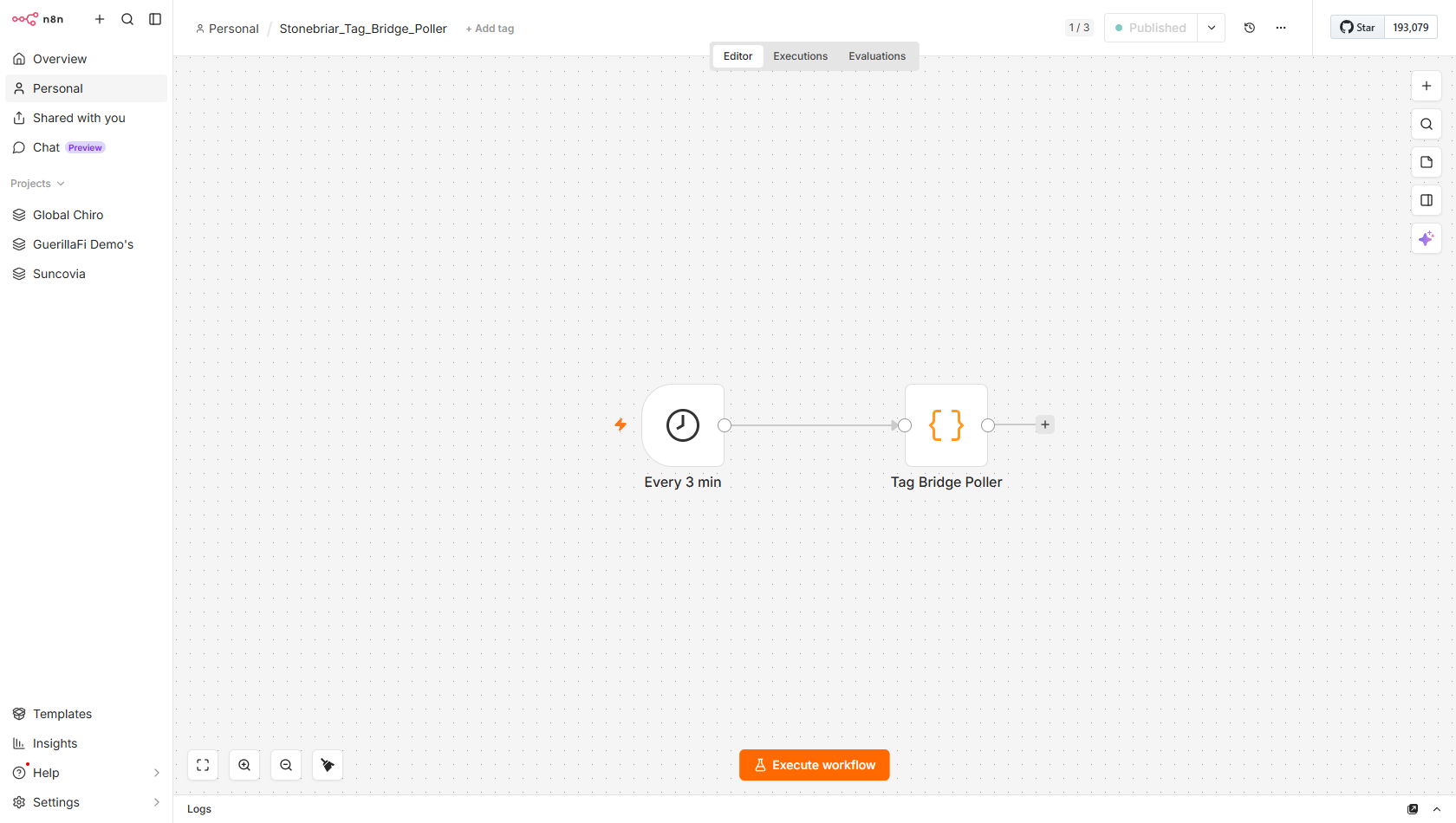
Stonebriar_Tag_Bridge_PollerfiringPoll GHL every 3 minutes for 5 intent tags set by Jenny (GHL Conversation AI), strip each tag first to prevent re-fire, and forward the contact to the correct n8n engine workflowOutcome The GoHighLevel “Jenny” SMS bot can trigger any booking action just by tagging a contact — every few minutes this turns that tag into the matching workflow (book, reschedule, cancel, schedule-check, or call-me-back).
Trigger
n8n Schedule trigger: every 3 minutes. No external webhook -- pure poller. GHL Conversation AI (Jenny) sets tags on contacts based on homeowner intent; this workflow is the bridge that converts those tags into n8n engine calls.
Module flow
- Every 3 min—Schedule trigger fires every 3 minutes around the clock minutesInterval: 3
- Bridge: cancel-requested—GHL search by tag cancel-requested -> strip tag first (GR-008 dedupe) -> POST stonebriar/cancel-appt {contact_id} -> if webhook fails, re-add tag (self-heal) cancel-requested stonebriar/cancel-appt
- Bridge: schedule-check—GHL search by tag schedule-check -> strip tag -> POST stonebriar/schedule-check {contact_id} -> self-heal on failure schedule-check stonebriar/schedule-check
- Bridge: booking-requested—GHL search by tag booking-requested -> strip tag -> POST stonebriar/sms-book {contact_id, action:book} -> self-heal on failure booking-requested stonebriar/sms-book action:book
- Bridge: reschedule-requested—GHL search by tag reschedule-requested -> strip tag -> POST stonebriar/sms-book {contact_id, action:reschedule} -> self-heal on failure reschedule-requested action:reschedule
- Bridge: callback-requested—GHL search by tag callback-requested -> strip tag -> POST voice_trigger_call webhook 9f45335d {contact_id, phone} -> self-heal on failure (P21 pattern, added v2.0 2026-06-15) callback-requested 9f45335d-da8b-47c4-9465-6e9e6b2c571b
SMS booking engine
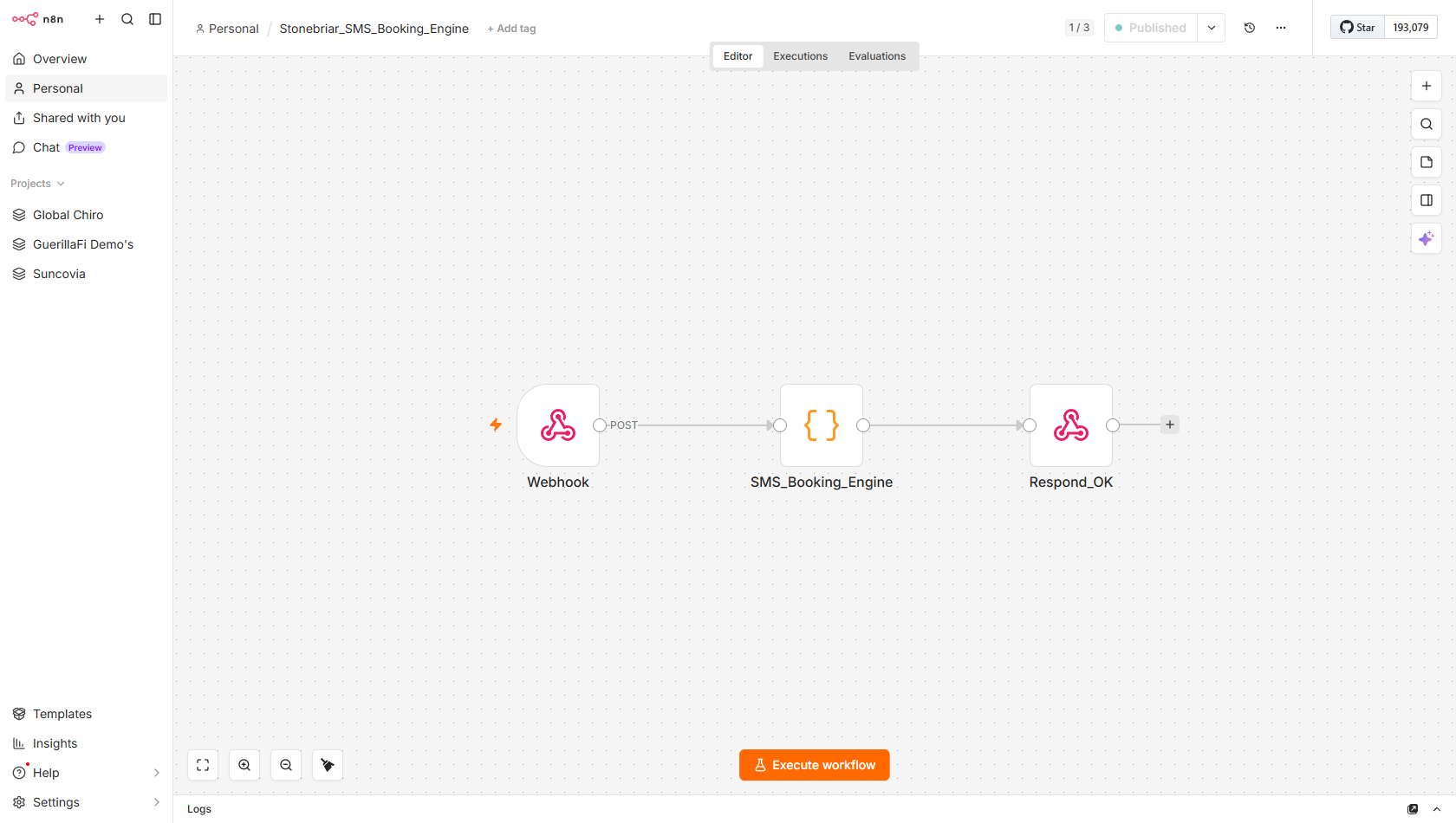
Stonebriar_SMS_Booking_EnginefiringHandle all calendar operations for the SMS channel -- book, reschedule, cancel, check, or prefetch slots against the GHL native calendar, then write the result to booking_reply so Jenny can merge it into her next messageOutcome The appointment is actually booked or changed on the CRM calendar and a truthful confirmation is written back to the contact — which Jenny reads out to the homeowner, so the text they get always matches what really happened.
Trigger
HTTP POST to stonebriar/sms-book from Tag_Bridge_Poller with {contact_id, action}. Action values: book, reschedule, cancel, check, prefetch. Cloned from Beem n8n_beem_book.js v6 (2026-06-16), adapted for GHL-native calendar.
Module flow
- Webhook—Listens at stonebriar/sms-book; accepts {contact_id, action} stonebriar/sms-book contact_id action
- SMS_Booking_Engine code node—Single code node implementing all 5 actions: book (POST /calendars/events/appointments), reschedule (PUT), cancel (DELETE), check (GET appointments + format), prefetch (GET free-slots + format for bot prompt). Timezone hardcoded America/Chicago throughout. America/Chicago /calendars/events/appointments /calendars/free-slots book reschedule cancel check prefetch
- Write booking_reply field—Writes the natural-language outcome (e.g. 'Your inspection is booked for Tuesday June 24 at 10 AM') to GHL LARGE_TEXT field mj2pMnYp9cOsiAo9y0qT -- Jenny merges this via {{contact.booking_reply}} mj2pMnYp9cOsiAo9y0qT booking_reply
- Write available_slots field—On prefetch/check actions: writes formatted slot list to field 0gK2qWEIrK94ysqGDzEX so Jenny's prompt includes real availability 0gK2qWEIrK94ysqGDzEX available_slots
- Write appointment_time_display—On successful book/reschedule: writes human-readable appointment time to TEXT field BlD6F0J5yvDzcgUV7uWN for CRM display BlD6F0J5yvDzcgUV7uWN appointment_time_display
- Respond_OK—Final respondToWebhook confirming engine completed
Appointment lookup
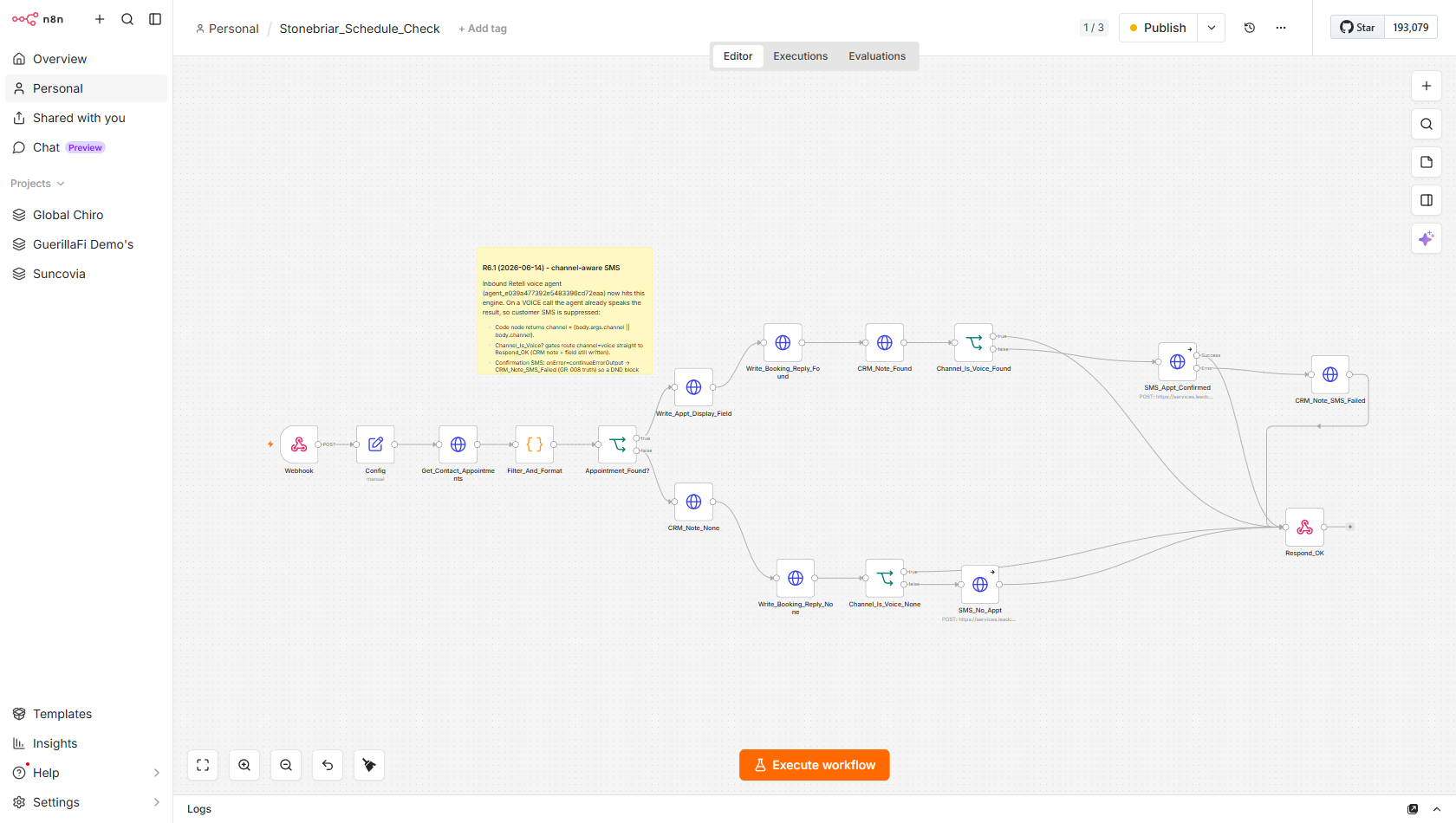
Stonebriar_Schedule_CheckfiringLook up a contact's next upcoming appointment and write the result to booking_reply -- handles both voice (skip SMS) and SMS channelsOutcome The homeowner is told their real upcoming inspection — by text, or read out by Sarah on a call — straight from the calendar, with no guessing.
Trigger
HTTP POST to stonebriar/schedule-check from Tag_Bridge_Poller (tag=schedule-check) or directly from a Retell voice agent function tool call (with channel=voice in payload). Payload: {contact_id, channel?}.
Module flow
- Webhook + Config—Webhook at stonebriar/schedule-check; Config set node loads GHL API creds and calendar ID HwJD5Ujgck1FJERzBZVw stonebriar/schedule-check HwJD5Ujgck1FJERzBZVw
- Get_Contact_Appointments—GET /contacts/{id}/appointments to retrieve all appointments for this contact /contacts/{id}/appointments
- Filter_And_Format—Code node: filters for confirmed future appointments on calendar HwJD5Ujgck1FJERzBZVw, sorts by start time, formats in Central Time (America/Chicago) confirmed America/Chicago
- Appointment_Found? branches—IF: appointment found -> Write_Appt_Display_Field then Write_Booking_Reply_Found then CRM_Note_Found; not found -> Write_Booking_Reply_None then CRM_Note_None Write_Booking_Reply_Found Write_Booking_Reply_None
- Channel_Is_Voice_Found / None gates—IF on each path: if channel=voice, goes directly to Respond_OK (skips SMS); otherwise sends SMS confirmation via GHL conversations API channel=voice /conversations/messages
- CRM_Note_SMS_Failed—continueErrorOutput on the SMS node: if SMS send fails, writes a CRM note and still responds OK -- booking_reply field is already written CRM_Note_SMS_Failed
- Respond_OK—respondToWebhook terminates the workflow; Retell reads booking_reply from GHL field if calling as a function tool
Appointment cancel
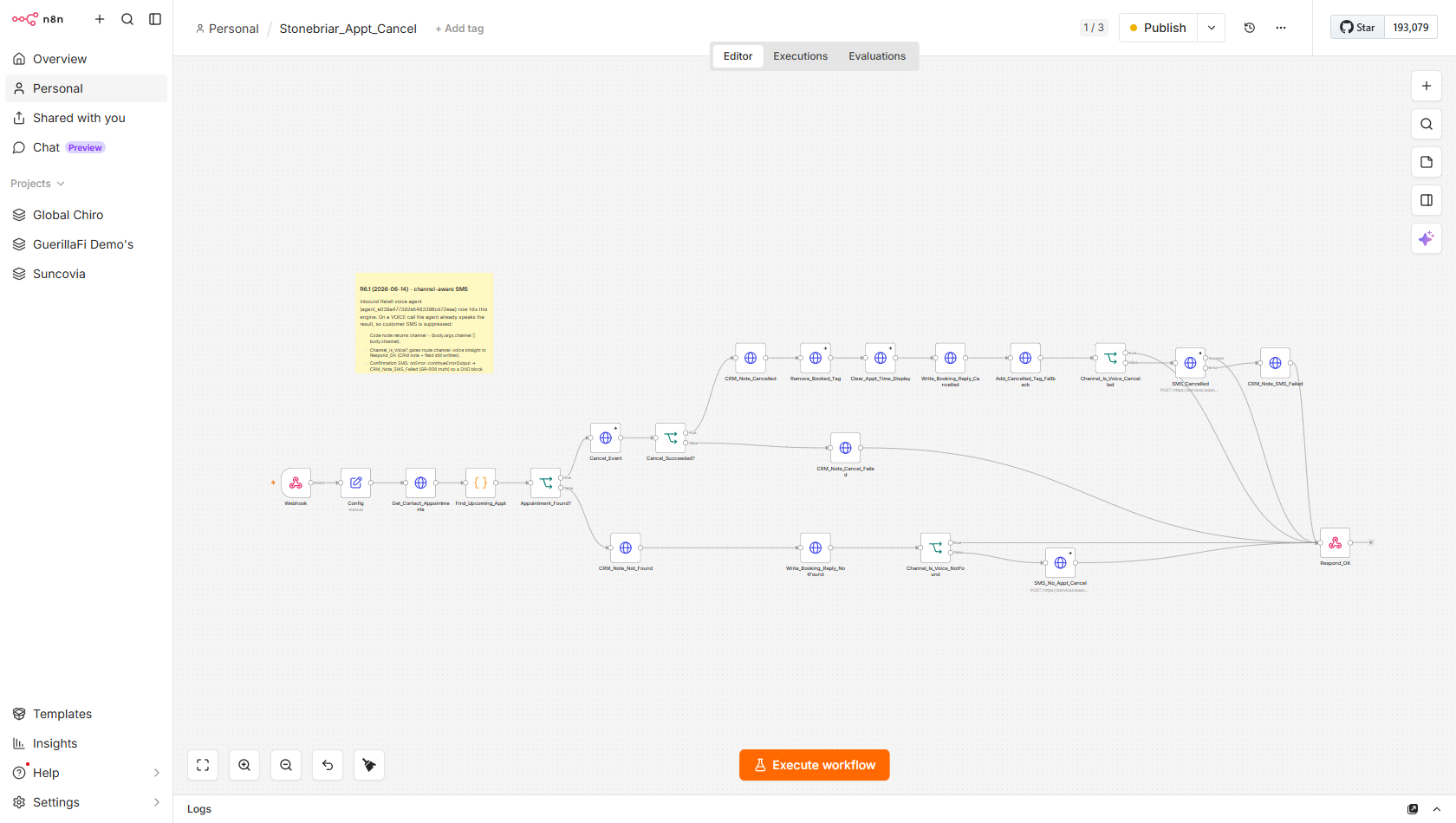
Stonebriar_Appt_CancelfiringCancel the contact's next upcoming inspection appointment, remove the booked tag, write booking_reply, and notify the homeowner -- with voice-channel awareness to skip the SMS when called from SarahOutcome The inspection is cancelled on the calendar, the booked tag is removed, and the homeowner gets a confirmation — keeping the calendar and the CRM in sync.
Trigger
HTTP POST to stonebriar/cancel-appt from Tag_Bridge_Poller (tag=cancel-requested) or from a Retell voice agent function tool call (with channel=voice). Payload: {contact_id, channel?}.
Module flow
- Webhook + Config—Webhook at stonebriar/cancel-appt; Config loads GHL creds and calendar ID HwJD5Ujgck1FJERzBZVw stonebriar/cancel-appt HwJD5Ujgck1FJERzBZVw
- Get_Contact_Appointments + Find_Upcoming_Appt—GET appointments; code node finds the soonest confirmed future event and extracts its event_id for the DELETE call /contacts/{id}/appointments event_id
- Appointment_Found? -> Cancel_Event—IF: if appointment found, DELETE /calendars/events/{eventId}; if not found, branches to CRM_Note_Not_Found and exits /calendars/events/{eventId} DELETE
- Cancel_Succeeded? -> CRM_Note_Cancelled—IF: on successful delete, writes CRM note; on failure writes CRM_Note_Cancel_Failed and exits CRM_Note_Cancelled CRM_Note_Cancel_Failed
- Remove_Booked_Tag + Clear_Appt_Time_Display—Removes booked tag from contact; clears appointment_time_display field BlD6F0J5yvDzcgUV7uWN booked BlD6F0J5yvDzcgUV7uWN /contacts/{id}/tags
- Write_Booking_Reply_Cancelled—Writes cancellation confirmation text to booking_reply field mj2pMnYp9cOsiAo9y0qT for Jenny to merge mj2pMnYp9cOsiAo9y0qT booking_reply
- Add_Cancelled_Tag_Fallback + Channel_Is_Voice_Cancelled—Adds a cancelled tag for funnel tracking; Channel IF: voice channel goes directly to Respond_OK; SMS channel sends confirmation via GHL conversations API channel=voice /conversations/messages
- CRM Note branches (all paths)—Every exit path (cancelled, failed, not found, SMS failed) writes a CRM note -- GR-008 visible artifact on every branch CRM_Note_SMS_Failed CRM_Note_Not_Found
Inbound caller lookup
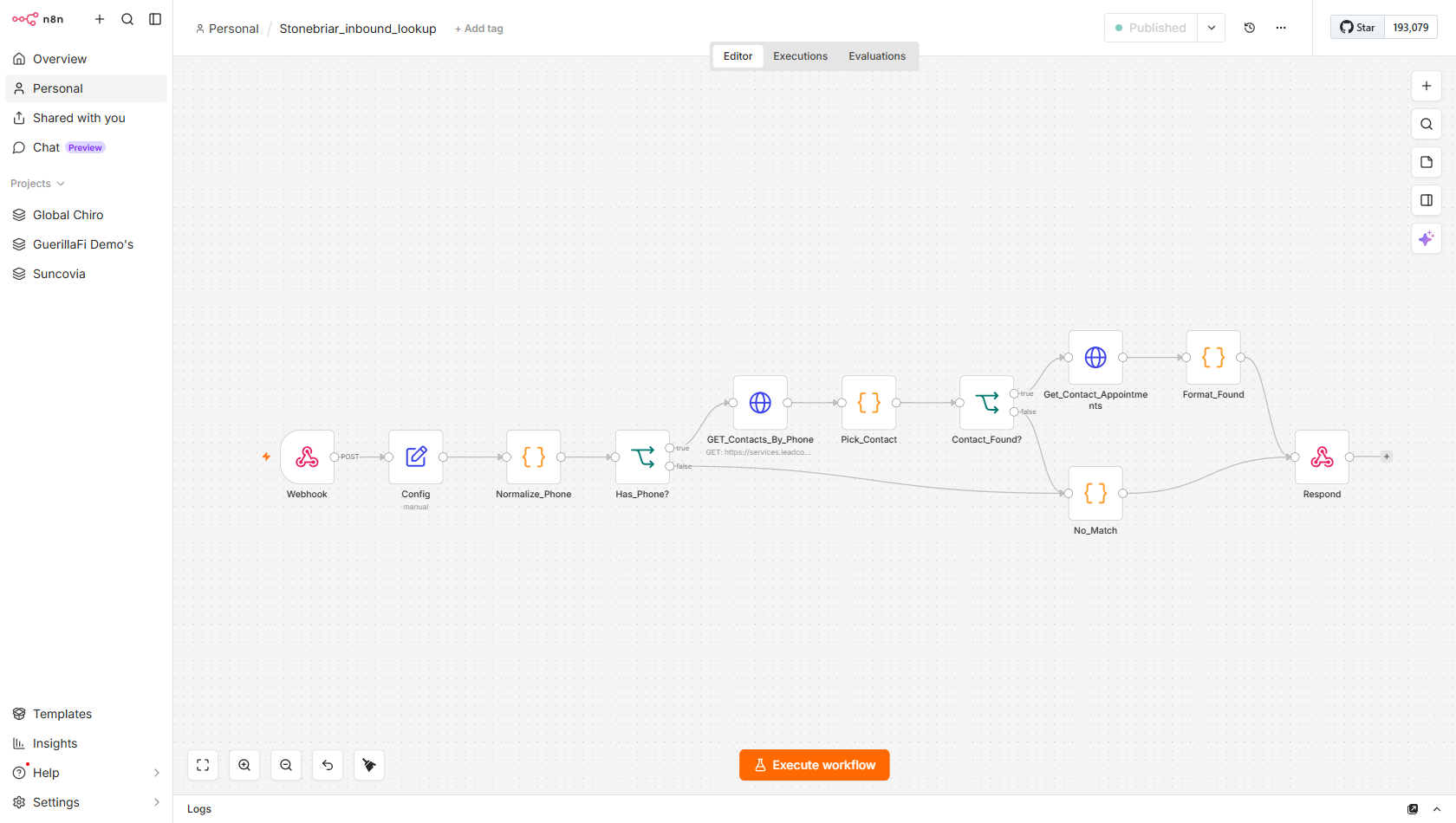
Stonebriar_inbound_lookupfiringIdentify an inbound caller in real time -- normalise the phone, search GHL, find their upcoming appointment, and return a structured summary to the Retell inbound agent within the function-tool timeoutOutcome When a homeowner calls the main line, Sarah instantly knows who they are and their next inspection, so she greets them by name and helps right away instead of “let me look you up.”
Trigger
HTTP POST to stonebriar/inbound-lookup called by the Retell inbound agent as a lookup_caller function tool when a homeowner calls the Stonebriar main line. Payload contains either body.args.phone or body.call.from_number (two shapes are handled after a bug fix).
Module flow
- Webhook + Config—Webhook at stonebriar/inbound-lookup; Config loads GHL API key and location ID stonebriar/inbound-lookup
- Normalize_Phone—Code node: handles both body.args.phone and body.call.from_number input shapes; normalises to E.164 (+1XXXXXXXXXX) body.args.phone body.call.from_number E.164
- Has_Phone? -> GET_Contacts_By_Phone—IF: if normalised phone is valid, search GHL /contacts/ by phone; if not, go directly to No_Match response /contacts/ phone
- Pick_Contact—Code node: selects the best GHL contact match from search results
- Contact_Found? -> Get_Contact_Appointments—IF: if contact found, GET /contacts/{id}/appointments; if not found, go to No_Match with empty response /contacts/{id}/appointments
- Format_Found—Code node: builds structured response with contact_id, first_name, email, has_appointment (bool), appointment_summary (plain text), event_id contact_id first_name has_appointment appointment_summary event_id
- No_Match + Respond—No_Match code returns empty-contact response; single Respond respondToWebhook node handles both found and not-found paths
The email AI assistant
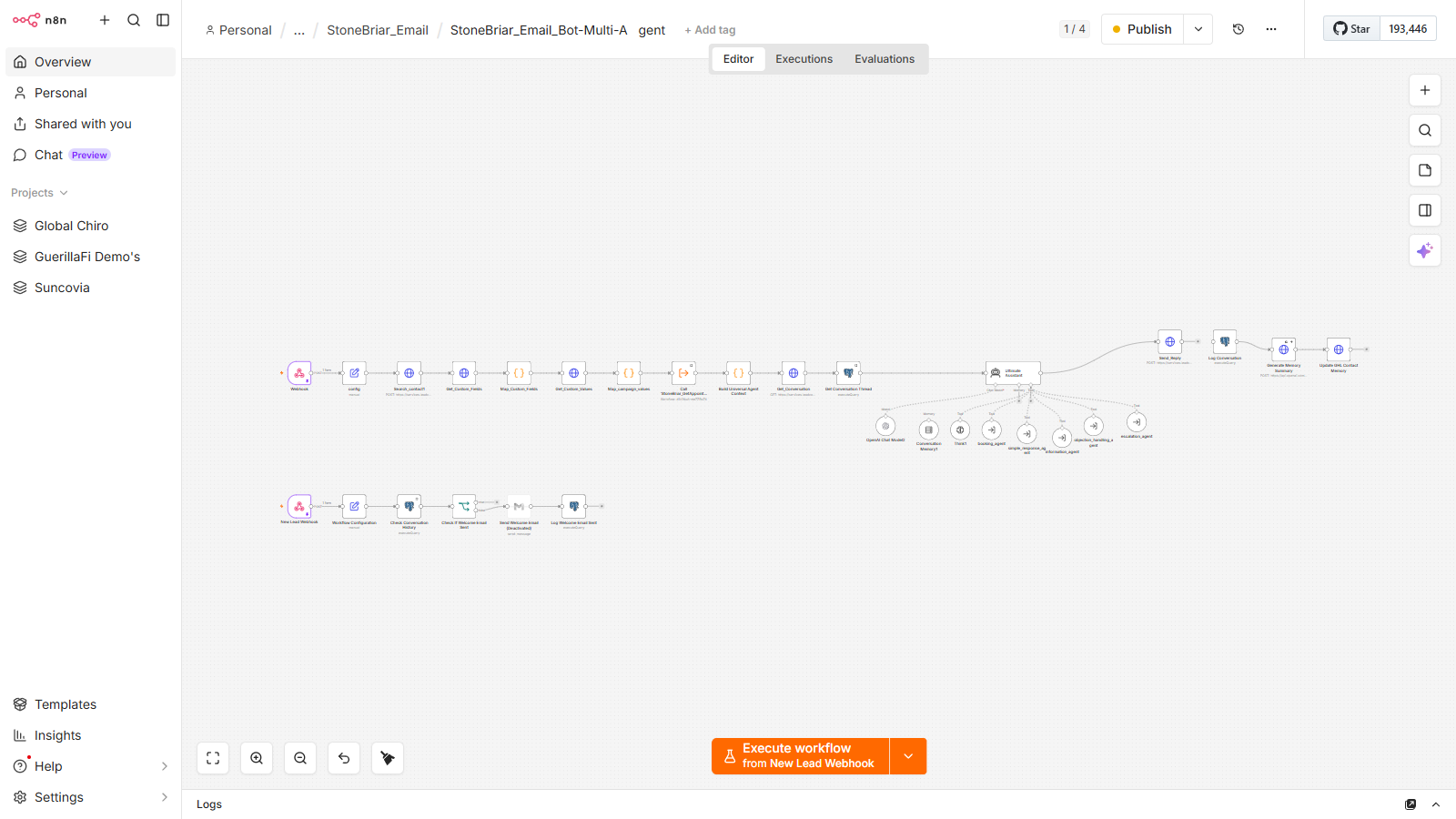
StoneBriar_Email_Bot-Multi-AgentfiringWhen a lead emails in, a multi-agent AI reads the full contact context, routes to the right specialist, drafts a personalized reply, and sends it.Outcome Inbound emails get an on-brand, context-aware reply in seconds. The right specialist agent handles each one -- book, answer, handle an objection, or escalate -- and every exchange is logged back to the CRM.
Trigger
Fires on an inbound email. It loads the contact's full GoHighLevel record, custom fields, campaign values, appointments, and the prior email thread before the AI replies.
Module flow
- config + Search_contact—Loads settings and pulls the emailer's full GoHighLevel record.
- Custom fields + campaign values—Maps the contact's fields and campaign data into context. GHL
- Get appointments + conversation thread—Pulls existing appointments and the prior email thread so the AI has the full picture.
- Build Universal Agent Context—Assembles everything into the variables the AI reads.
- Ultimate Assistant (multi-agent)—A LangChain agent with memory plus 5 specialist tools: booking, simple-response, information, objection-handling, escalation. OpenAI memory
- Send_Reply + Log Conversation—Sends the email reply and logs the exchange back to GoHighLevel. visible artifact
Rep SMS reply poller
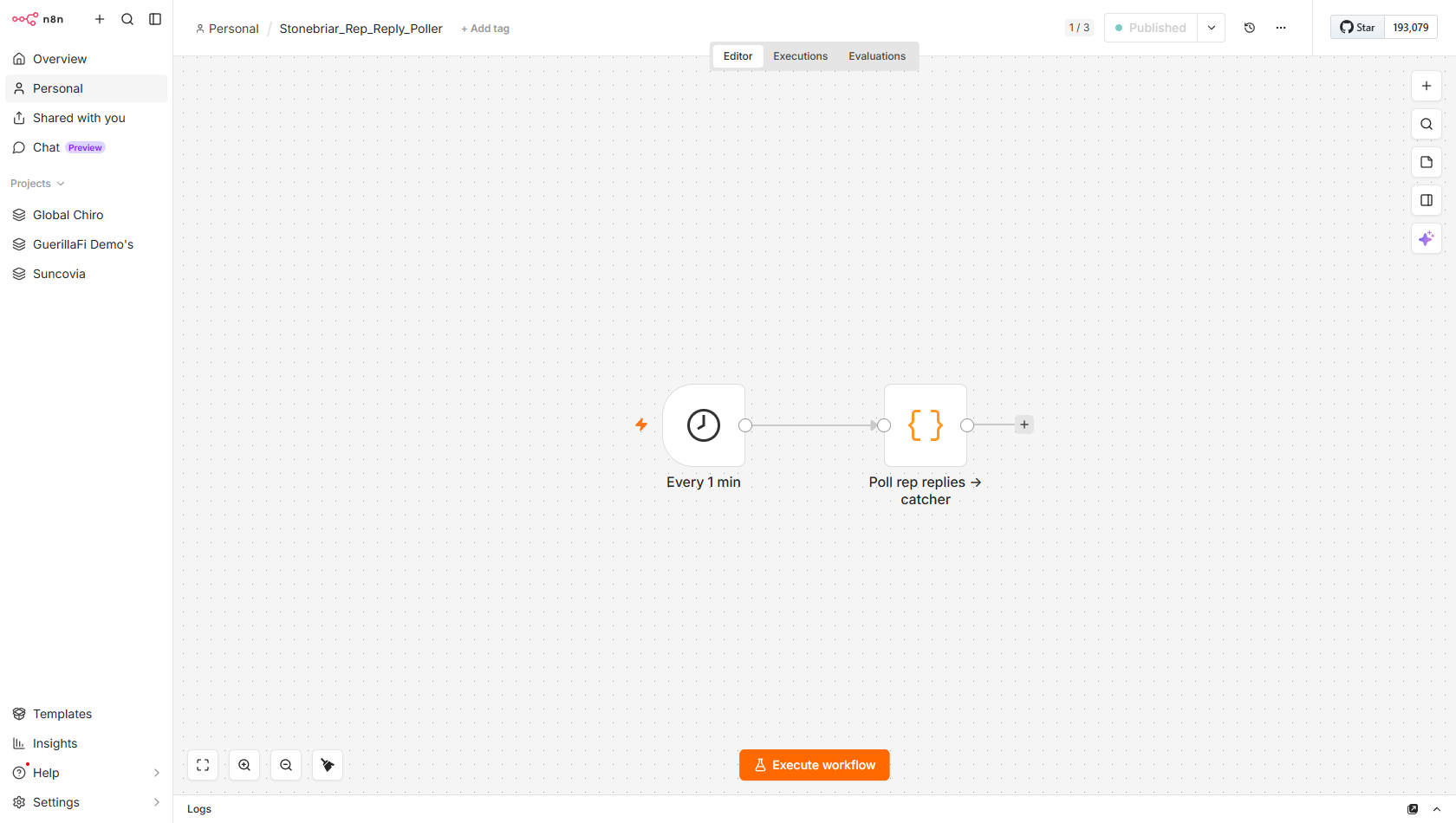
Stonebriar_Rep_Reply_PollerfiringMonitor the GHL inboxes of two field reps every minute and forward any new inbound text messages to Rep_Outcome_Catcher for outcome processingOutcome A field rep just texts 1, 2 or 3 after an inspection and it's picked up automatically and handed to the outcome catcher — no app, no form to fill in.
Trigger
n8n Schedule trigger: every 1 minute. Polls GHL conversations for two hardcoded staff phone numbers: Darian (+14693436120) and a second rep (+18325852875). Uses n8n staticData to track the last-seen message ID per rep so only genuinely new messages are forwarded.
Module flow
- Every 1 min—Schedule trigger fires every 60 seconds minutesInterval: 1
- Poll rep replies -> catcher—Code node: queries GHL conversations for Darian (+14693436120) and a second rep (+18325852875); uses staticData to track last-seen message ID per number; for each new inbound message, POSTs {from_phone, body, contact_id} to stonebriar/rep-outcome; bootstrap guard on first run seeds seen state without replaying history +14693436120 +18325852875 stonebriar/rep-outcome staticData pit-b4407fda-bbf6-44c4-9007-bee80f590d00
Rep outcome recorder
Stonebriar_Rep_Outcome_CatcherfiringAccept a rep's 1/2/3 digit text, map it to the homeowner who just had an inspection, record the appointment outcome in GHL, and confirm back to the repOutcome The result the rep texted is written onto the right customer's record and the rep gets a confirmation — so the pipeline reflects what actually happened in the field.
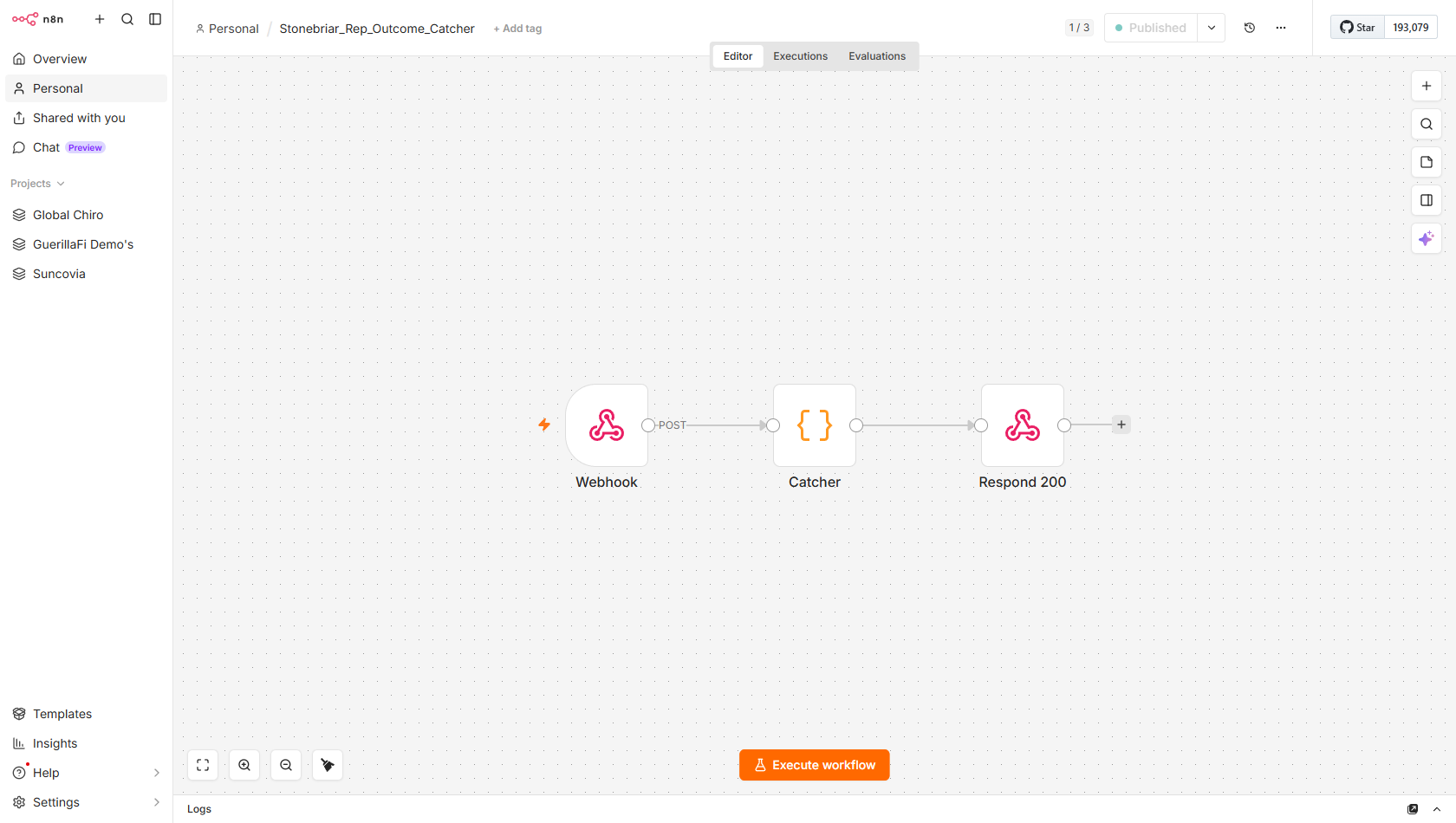
Trigger
HTTP POST to stonebriar/rep-outcome from Stonebriar_Rep_Reply_Poller. Payload: {from_phone, body, contact_id}. The body field contains the rep's reply digit (1=completed, 2=no-show, 3=reschedule).
Module flow
- Webhook—Listens at stonebriar/rep-outcome; receives {from_phone, body, contact_id} from Rep_Reply_Poller stonebriar/rep-outcome from_phone body
- Catcher code node—Validates from_phone is a known staff number; maps body digit (1/2/3) to appointment outcome text; searches GHL for contacts tagged outcome-pending; sets appointment outcome field (27quKIEu2BIBFCyszE0E) on the matching customer; strips outcome-pending tag; texts the rep a confirmation; handles disambiguation if multiple pending customers exist 27quKIEu2BIBFCyszE0E outcome-pending appointment outcome +14693436120 +18325852875
- Respond 200—respondToWebhook terminates the workflow after outcome is recorded
Appointment safety net
Stonebriar_Appt_Safety_NetfiringCatch any inspection appointment that ended without a rep outcome being recorded -- auto-mark it as a no-show after 3 hours or escalate with a GHL task after 4 hoursOutcome No inspection slips through the cracks — if a rep forgets to report, this auto-marks a no-show after a few hours and flags overdue ones, keeping the pipeline honest on its own, every hour.
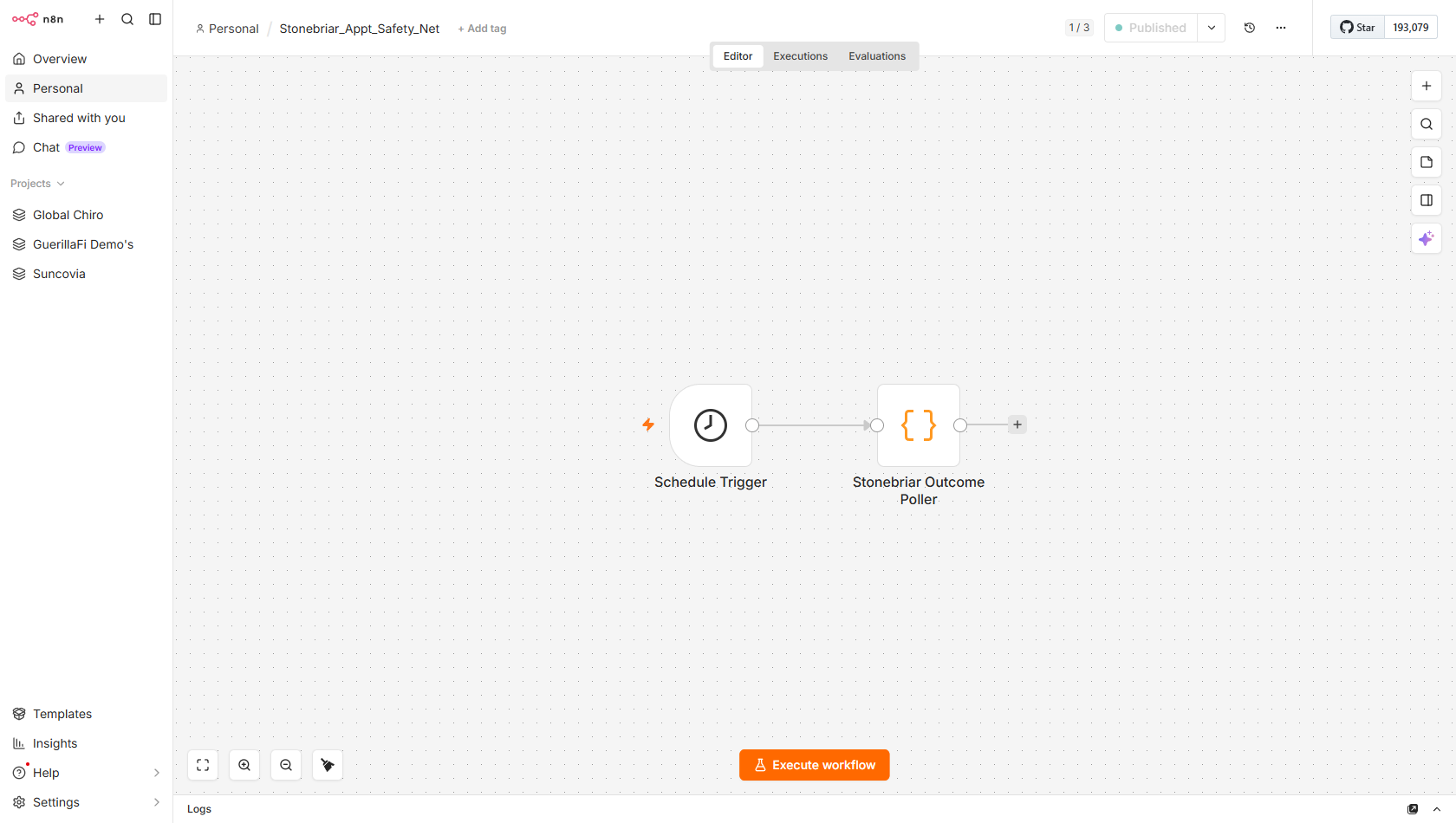
Trigger
n8n Schedule trigger: every 1 hour. Scans GHL calendar HwJD5Ujgck1FJERzBZVw for all appointments that ended within the last 26 hours. Uses n8n staticData to act at most once per appointment ID.
Module flow
- Schedule Trigger—Fires every 60 minutes to scan for unresolved inspection outcomes hoursInterval: 1
- Stonebriar Outcome Poller code node—Queries GHL calendar events for appointments ended in last 26h; for each: checks outcome field (27quKIEu2BIBFCyszE0E) and outcome-set tag -- skips if already handled; if ended >3h and no outcome: writes CRM note FIRST (GR-008), moves pipeline to No-Show stage (bc717599), adds no-show + outcome-no-show tags, removes booked; if ended >4h and not flagged: writes CRM note, creates GHL task for rep, adds outcome-overdue tag; within 3h grace window: skip. staticData deduplicates across runs. 27quKIEu2BIBFCyszE0E outcome-set bc717599-e7e6-4133-bbb7-c8306495e1ca no-show outcome-no-show outcome-overdue HwJD5Ujgck1FJERzBZVw staticData
Bulk reactivation push
Stonebriar_Reactivation_Bulk_PushfiringRe-enter a batch of dormant leads into the nurture system by tagging them for the 7-touch reactivation cadence or the full 14-day fresh funnelOutcome A batch of dormant leads is dropped back into a re-engagement cadence in one go — turning the 2,000–10,000-lead database back into booked inspections.
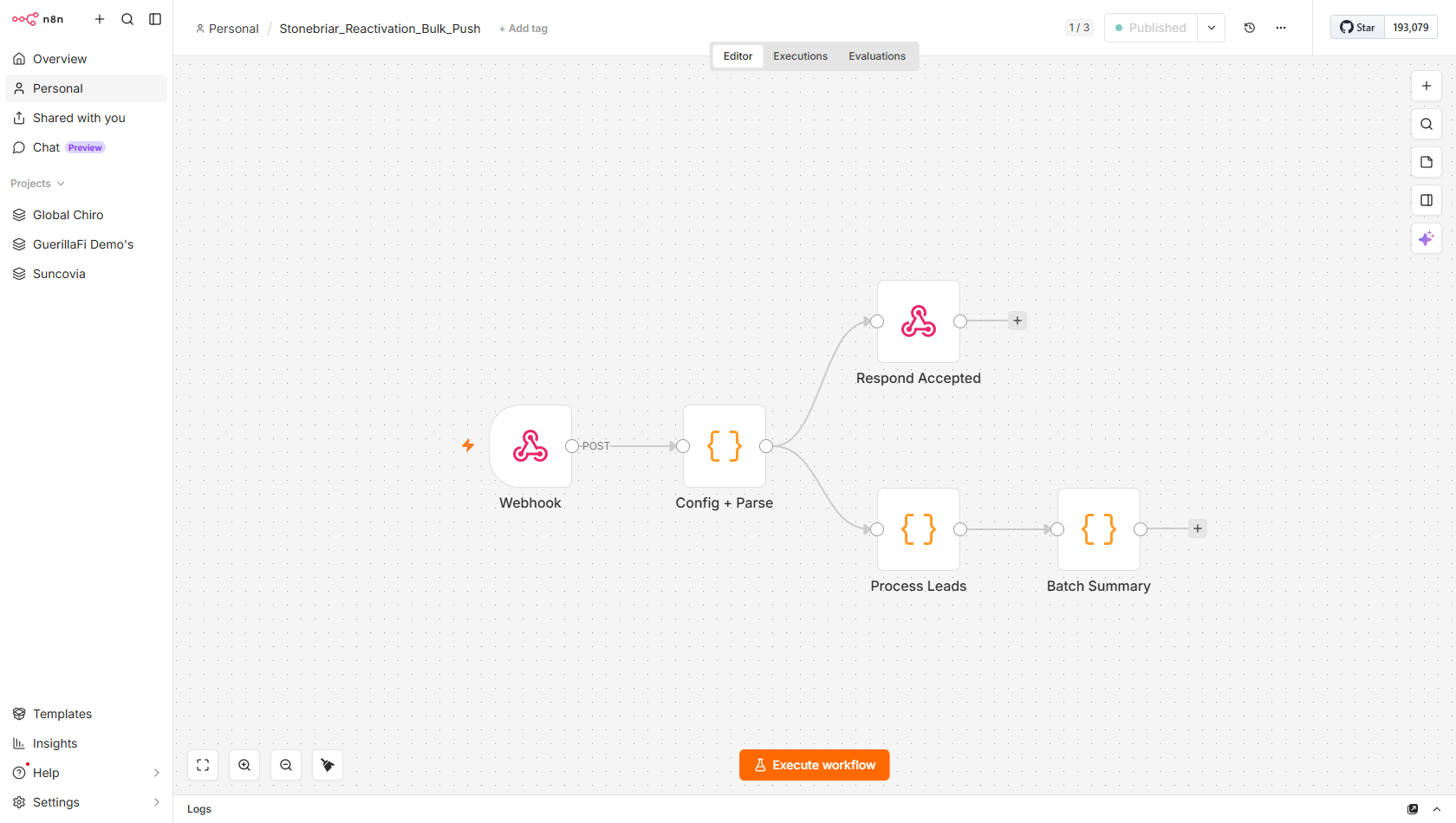
Trigger
HTTP POST to stonebriar/reactivation-bulk-push with {leads:[{contact_id,...}], mode, dry_run?, entry_tag?}. Mode=reactivation tags with 60-day-sunset (GHL WF-6). Mode=fresh tags with non-booked-funnel (GHL WF-1). Supports dry_run=true for testing without writing tags.
Module flow
- Webhook—Listens at stonebriar/reactivation-bulk-push; receives the leads batch with mode and optional dry_run stonebriar/reactivation-bulk-push leads[] mode dry_run
- Respond Accepted—Sends immediate 200 to the caller before the batch begins (prevents HTTP timeout on large batches)
- Config + Parse—Code node: validates body.leads array, determines tag to apply (60-day-sunset for mode=reactivation, non-booked-funnel for mode=fresh), sets throttle delay between contacts 60-day-sunset non-booked-funnel mode
- Process Leads—Code node: iterates the leads array sequentially with throttle; for each valid contact_id, applies the tag to GHL /contacts/{id}/tags; dry_run skips all GHL writes; tracks processed/skipped/error counts /contacts/{id}/tags dry_run throttle
- Batch Summary—Code node: assembles and logs batch results (total, processed, skipped, errors) for operator review processed skipped errors
Referral lead intake
Stonebriar_Referral_IntakefiringParse a field rep's free-text referral message into a phone number and name, create the referral contact in GHL, and update the referring rep's record with a capture confirmationOutcome A rep's quick “my neighbor has hail damage” text becomes a real new lead in the CRM (and the referrer gets credited) — so word-of-mouth enters the same machine as every other lead.
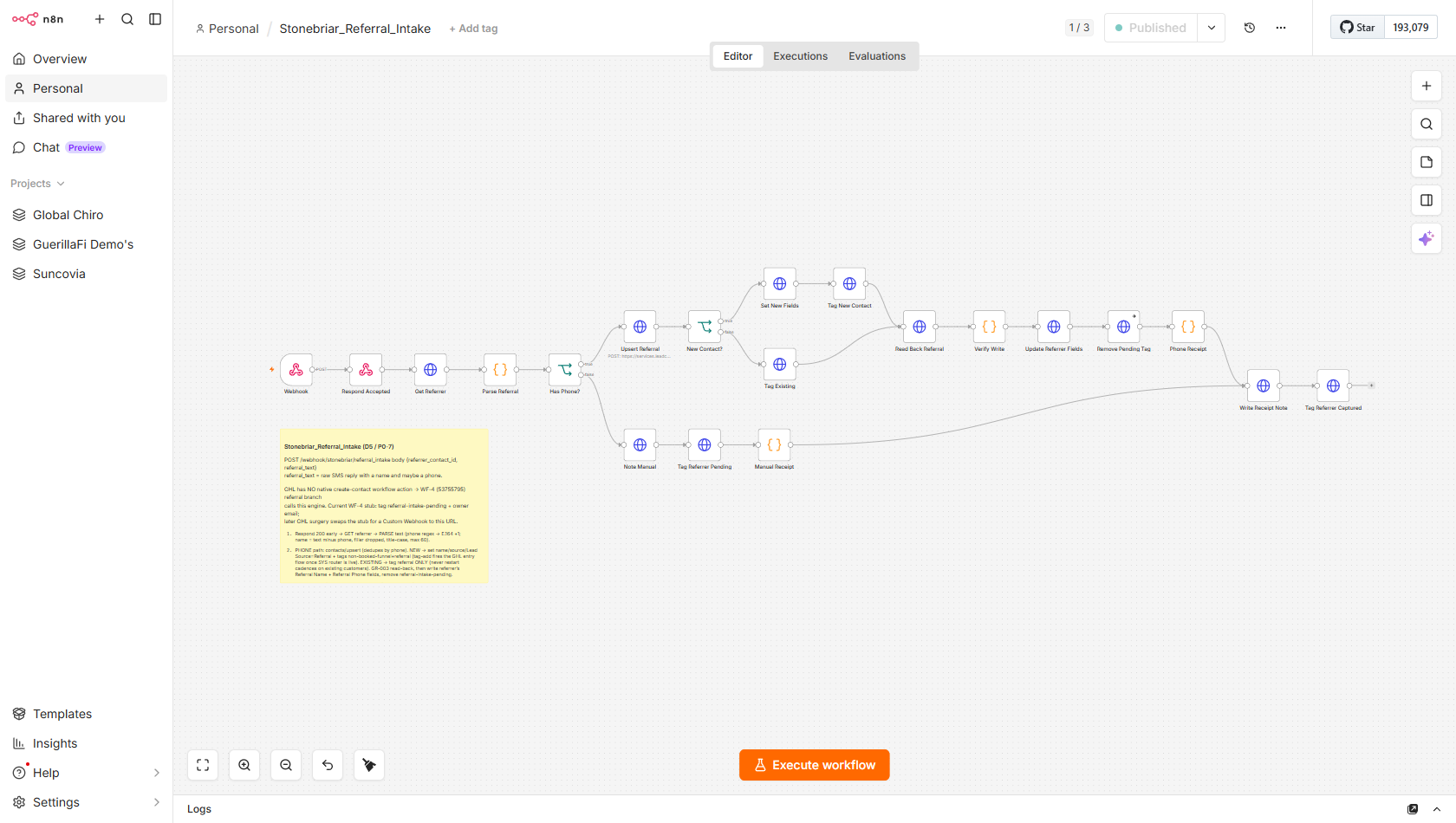
Trigger
HTTP POST to stonebriar/referral_intake from a GHL Workflow triggered when a rep tags a contact with stonebriar-referral. Payload: {referrer_contact_id, referral_text}. The referral_text is the rep's raw SMS message containing a name and/or phone number.
Module flow
- Webhook + Respond Accepted—Webhook at stonebriar/referral_intake; Respond Accepted fires immediately for async processing stonebriar/referral_intake referrer_contact_id referral_text
- Get Referrer—GET /contacts/{referrer_contact_id} to fetch the referring rep's full record /contacts/{id}
- Parse Referral—Code node: extracts a US phone number (normalised to E.164) and name from free text using regex; three outcomes: phone+name found, name only, unparseable E.164 regex
- Has Phone? -> Upsert Referral—IF: if phone found, POST /contacts/upsert by phone to create or find existing contact; if no phone, branches to manual-follow-up path /contacts/upsert
- New Contact? -> Set New Fields + Tag New—IF: if new contact, sets fields (name, source=referral) and tags referred-lead + non-booked-funnel; if existing, tags referred-existing referred-lead non-booked-funnel referred-existing
- Read Back Referral + Verify Write—Re-fetches the upserted contact and verifies the write succeeded (read-back confirmation pattern)
- Update Referrer Fields + Remove Pending Tag—Increments referral count field on referrer; removes referral-intake-pending tag; adds referral-captured tag referral-intake-pending referral-captured
- Write Receipt Note—Writes a CRM note on the referrer contact confirming the referral was captured (name, phone, new contact ID) /contacts/{id}/notes
- Manual path (no phone found)—Tags referrer referral-intake-pending; writes a note asking rep to provide a phone number; Manual Receipt code builds the note body referral-intake-pending Note Manual
Error alert
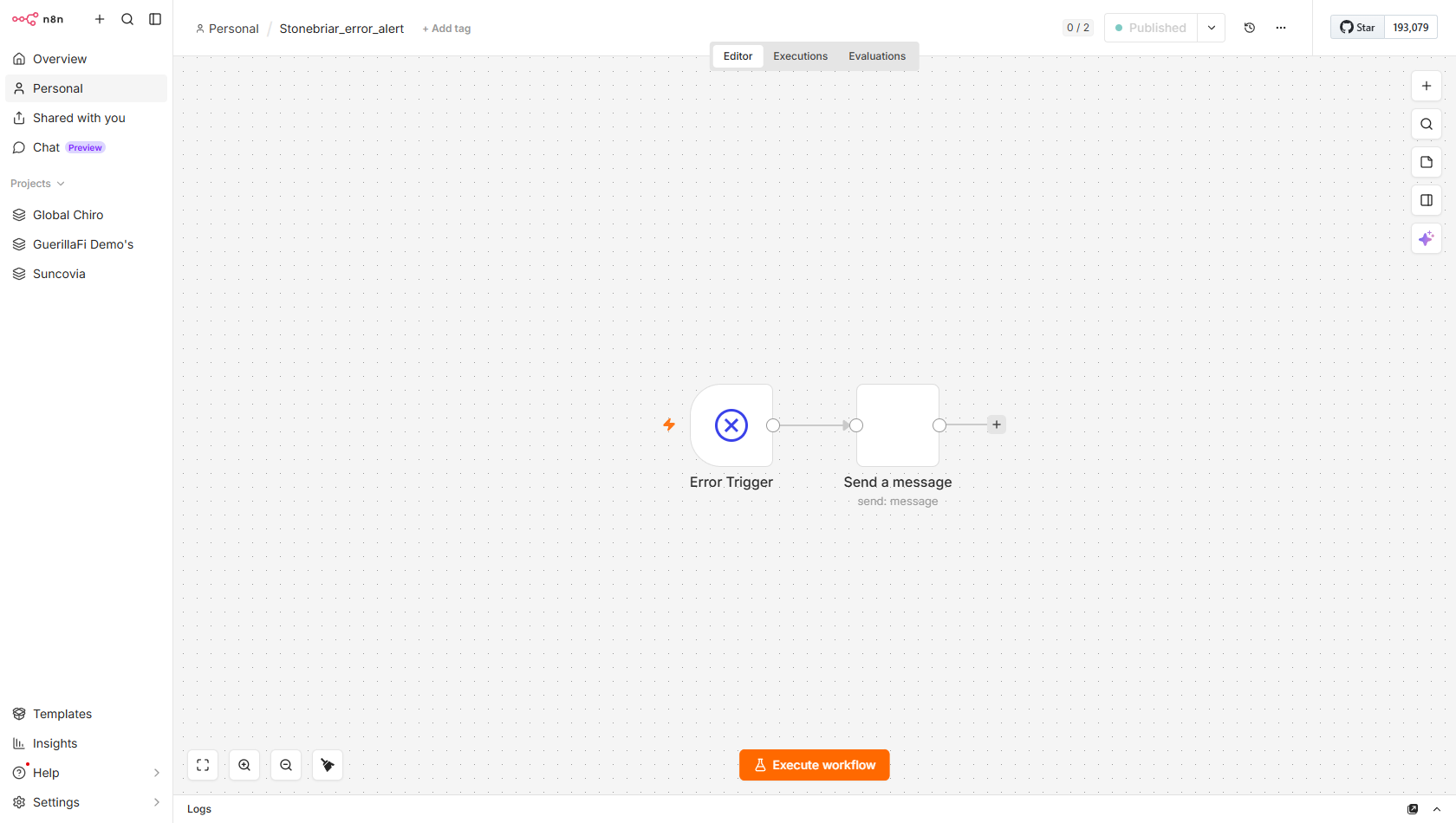
Stonebriar_error_alertfiringCatch any workflow failure on the n8n instance and send an immediate Gmail alert to Jay with full error contextOutcome If any workflow ever fails, Jay gets an email instantly with the details — so problems are caught and fixed fast instead of silently breaking the system.
Trigger
n8n errorTrigger -- fires automatically when any workflow that has errorWorkflow set to WMmYytB6NH41OMHy encounters an unhandled error. No webhook or schedule. This is the global error handler for all Stonebriar workflows.
Module flow
- Error Trigger—errorTrigger node: receives error context from any failing workflow -- workflow name, node name, error message, execution ID errorTrigger workflow.name node.name error.message executionId
- Send a message (Gmail)—Sends email to jjcavada1@gmail.com with workflow name, failed node, error text, and a direct link to the n8n execution log jjcavada1@gmail.com Gmail execution URL
GoHighLevel · the CRM layer
GoHighLevel is the system of record: it holds every contact, runs the SMS bot, drives the pipeline, and fires the n8n workflows by adding tags. n8n does the heavy lifting; GHL is where the lead lives and where every action is written back so a human can always see it.
The tags that drive everything
Adding a tag in GoHighLevel is what fires an automation. This is the wiring between GHL and n8n.
| Tag | What it triggers |
|---|---|
| non-booked-funnel · -lead | Starts the lead — GHL WF-1 fires the First Touch webhook into n8n |
| booking-requested | Jenny captured a booking intent → SMS Booking Engine books it |
| reschedule-requested · cancel-requested | → the reschedule / cancel engine |
| schedule-check | → reads the appointment back from the calendar |
| booked | State tag: suppresses further dials and nurture (GR-001) |
| ai-active · engaged-not-booked | Lead is mid-conversation — don't cold-call over it |
| rep-account | Excludes field-rep phones from the customer bot (GR-019) |
GHL-side workflows & pipeline
| In GoHighLevel | Role |
|---|---|
| WF-1 · 14-Day Lead Cadence [Non-Booked] | Two tag triggers fire the First Touch webhook + run the 14-day follow-up cadence |
| Jenny Conversation AI | The SMS bot: answers, captures intent, tags the contact |
| Lead pipeline | New Lead → Contacted → Booked — moved by the n8n post-call + booking engines |
| Custom fields | Roof-image URL, booking_reply (the exact line the bot speaks), appointment fields |
Retell · the voice agent
Retell is the voice. A GPT-4.1 outbound agent calls new storm-damage leads and an inbound line answers the main number. Mid-call, the agent reaches into n8n through function tools to read and write the calendar in real time.
| Agent | Role |
|---|---|
| Stonebriar Outbound | Calls new leads, qualifies, books the inspection · gpt-4.1 |
| Stonebriar Inbound (Jenny) | Answers the main line, books + looks up callers |
| Primary number | +1 469 224 4004 |
Functions — the tools the agent calls mid-call
Each is a live webhook into the n8n booking + CRM workflows. The agent uses them while talking.
| Function | What it does |
|---|---|
| check_calendar_availability | Is a specific date/time open for an inspection? |
| check_calendar_slots | Pull available slots from a given date |
| book_appointment | Book the roof inspection |
| get_appointment · update_appointment · cancel_appointment | Read, reschedule, or cancel the existing inspection |
| get_current_datetime | Current time in the prospect's timezone |
| schedule_callback | Log a callback time when they can't talk now |
| send_sms · send_email | Text or email the booking link / details mid-call |
| update_ghl_contact | Write tags or fields to the contact mid-call |
| log_objection | Capture an objection verbatim |
| transfer_to_daylon | Live-transfer to a human during AZ business hours |
Dynamic variables — context passed in at call time
Injected from GoHighLevel so the agent already knows the lead before it speaks:
Prompt structure
The agent prompt is engineered, not improvised. Its backbone:
| Section | Why it's there |
|---|---|
| Identity + brand pronunciation | Who she is and how to say the company name |
| NEVER FABRICATE DATA | If a lookup is empty, don't invent — a hard guard from a real incident |
| Existing-appointment CONFIRM MODE | Re-checks for a booking before offering a time — anti double-booking (GR-001) |
| Voice & style + banned phrases | Sound like a warm human admin; no “AI tells” |
| Recording & compliance | Discloses recording near the top of the call |
| Greetings (outbound / inbound) | A different opener depending on who called whom |
Full workflow inventory
All 35 workflows with live status. firing = running now · sub = building block called by others · standby = built, off, ready · retired = unpublished 2026-06-18. The 19 firing entry points are detailed in full above; the sub-workflows below are the reusable building blocks they call.
Sub-workflows (in use, called by the flows above)
| Sub-workflow | Job |
|---|---|
| GetFreeSlots_SubWorkflow | Query open inspection slots |
| GetAppointments_SubWorkflow (+ _JJ) | List a contact's appointments |
| check_Availability_Sub_Workflows | Verify a specific slot is open |
| appointment_booking_sub_workflow | Book a confirmed slot |
| Update_Appointment_SubWorkFlow | Reschedule an appointment |
| Contact_Update_SubWorkflow | AI-assisted contact field writer |
What triggers what
The master map: every source event, the workflow it hits, and what happens next.
| Source | → Workflow | Downstream effect |
|---|---|---|
| New lead created + tagged in GoHighLevel | GHL WF-1 → first-touch | GHL fires First Touch + runs the 14-day cadence |
GHL tag non-booked-funnel | first-touch | Roof MMS → Dial 1 → Dial 2 |
| First_Touch (internal) | roof_image · voice_trigger_call | Roof photo · Sarah dials |
| Retell agent (mid-call) | voice_calendar_bookings | Check / book / reschedule / get appt |
| Retell agent (inbound) | inbound-lookup | Return caller + appointment to Sarah |
| Retell (call ends) | voice_post_call | DNC gate → summary → pipeline → log |
| GHL "Jenny" bot tags a contact | Tag_Bridge_Poller | Strips tag → fires the right engine ↓ |
tag booking/reschedule-requested | sms-book | SMS_Booking_Engine books / reschedules |
tag schedule-check / cancel-requested | schedule-check · cancel-appt | Read back / cancel appointment |
| Field rep SMS (1/2/3) | rep-reply-poller → rep-outcome | Set outcome field, confirm rep |
| cron · 1 hour | Appt_Safety_Net | Auto no-show / escalate |
| Any workflow error | error_alert | Email to jjcavada1@gmail.com |
Key IDs & config
Identifiers the workflows rely on. Secrets (keys/tokens) are redacted to their shape — real values live in the credential vault.
| Item | Value |
|---|---|
| GHL location | U9eehdYVTaneVBVevw0b |
| Lead pipeline | fMFWsnKweG7UwwUTnDJ2 |
| Inspection calendar | HwJD5Ujgck1FJERzBZVw |
| Timezone | America/Chicago |
| Voice number | +1 214 972 1282 |
| Retell outbound agent | agent_c7489b1000369067c5ef69e0dc |
| GHL token (PIT) | pit-xxxxxxxx-xxxx-… |
| Retell API key | key_xxxxxxxx… |
| n8n instance | guerilla-fi.app.n8n.cloud |
Retired / not in use
Verified against live execution history (2026-06-18). These are not firing — listed so the team knows exactly what's dormant and why. All reversible.
Retired — unpublished 2026-06-18 retired
The old n8n SMS chatbot subtree, superseded by the GoHighLevel "Jenny" bot + the tag bridge + the booking engines. Zero executions on record. Deactivated on 2026-06-18; can be switched back on if ever needed.
| Workflow | Was | Replaced by |
|---|---|---|
| sms_chatbot | n8n LangChain SMS agent | GHL Jenny bot + Tag_Bridge + engines |
| Send_SMS · Send_SMS_Notification | Direct Twilio SMS send | GHL conversations API |
Standby / off (already inactive)
| Workflow | Status |
|---|---|
| Reactivation_Call | standby Sarah re-dial cadence — switch on when Twilio is live + 100+ leads queued |
| Slots_Prefetch | off redundant — SMS_Booking_Engine prefetches inline |
| Inbound_SMS_Handler | off old Twilio receiver — superseded |
| Simple_Response copy 2 | archived duplicate |
Open items · for the dev
Surfaced by the live audit, ranked by priority. None block the system running — these are the "before you fully trust it" checks.
agent_c748… / key key_0e3e… — newer than the old handoff notes. Confirm that's the published production agent.Google Maps key (Roof_Image): verify the Static Maps key is live + enabled, or roof photos silently fall back to text-only.
America/Chicago at the workflow level on voice_post_call + Voice_Calendar_Bookings. Confirm the inbound number routes to Retell (Twilio trunk Origination). Add the post-booking duplicate-check safety net in Voice_Calendar_Bookings.Who to contact
| Role | Contact |
|---|---|
| Automation engineer | JJ · jjcavada1@gmail.com |
| Stonebriar — primary | Darian Stephens · +1 469 343 6120 |
| Stonebriar — ops | Allison Dunn |
| Error alerts go to | jjcavada1@gmail.com |
| n8n instance | guerilla-fi.app.n8n.cloud |